 Production
Echolocation · Free academy
Choose what to explore.
Inspect equipment, practice a decision or work through a fictional drawing change.
Free instructor workshop
Review a drawing change.
Brief your instructor.
Choose a fictional drawing change, inspect the linked equipment and record what needs updating before learners see it.
Try the separator controls Open three-phase operations Replay the OpenFOAM feed stepGo inside.
Mechanical learning studio
Go inside.
One layer at a time.
Choose a system. Watch its parts separate, jump to a chapter, then orbit and isolate the same geometry in 3D.
Open the interactive 3D workbench
← Back to your draft reviewEcholocation · Separator simulation
See the feed step through the vessel.
Replay oil, water and air volume fractions computed by OpenFOAM. At 30 seconds the liquid inlet rises while air remains at 30 L/min.
OpenFOAM field snapshots
AirOilWater
Feed enters at left. Water leaves below the settling zone. Oil leaves beyond the weir, with the gas outlet above.
Mixed cells blend phase colours.
One snapshot per simulated second. Playback runs at up to 5× simulation time.
Inlet conditions
Air 30 L/minOil 9.1 L/minWater 9.1 L/min
Water at the oil outlet
—Current computed snapshot. The benchmark below averages a time window in each feed condition.
Compare with the pilot tests
| Liquid feed | OpenFOAM | Pilot test | Difference |
|---|
Simulation setup and comparison limits
OpenFOAM v1912, multiphaseInterFoam. The model has a planar 0.90 × 0.30 m section, a simplified diverter and weir, an incompressible three-phase mixture and prescribed liquid outlet rates. The pilot used a cylindrical vessel and adjusted outlet valves. Inlet rates and fluid properties are from the published comparison. These training runs are exploratory, with no established mesh convergence, validated plant settings or reproduced valve history.
A 651-cell repeat gave about 0.001% water in the oil outlet at lower feed and 48.9% at higher feed. The lower-feed result is sensitive to mesh resolution.
Model inputs and pilot test comparison, Tables 3 and 5Echolocation · Separator studies
What happens when the liquid feed rises?
Switch between two published three-phase cases, then compare the CFD prediction with what a pilot separator measured.
Phase feeds
Gas stays fixed. Oil and water change together.
Loading the published cases…
The diagram encodes inlet flow. For a visual tour of the phase routes, open the training cutaway.
Water in the oil outlet
Published CFD—
Pilot test—
Choose a published condition to compare its results.
Make the call
Does this CFD comparison justify using the predicted value as an operating target?
Published cases, outlet sensitivity and limits
| Feed | Gas | Oil | Water | CFD water in oil | Test water in oil |
|---|
Water recovery measures the share of inlet water reaching its own outlet. The feed cases above measure water carried into the oil outlet.
The physical tests adjusted outlet valves between feed conditions. The CFD comparison held its outlet conditions fixed. These are two published operating points. This lesson does not generate new CFD fields or extrapolate to a PETRONAS vessel.
Shin et al. · CFD comparison, Table 5 and Figure 4 · Ahmed et al. · Pilot separator experiments
Echolocation · Separator operations
Follow the three phases.
Change the feeds and outlets. Watch the pressure respond as the gas inventory and headspace change.
Open the live 3D cutaway
Amber · OilCyan · WaterMint · Gas
Moving markers show each phase’s route. The meters report simulated flow and absolute pressure.
- Liquid in
- —
- Oil out
- —
- Water out
- —
- Gas vent
- —
- Gas headspace
- —
- Oil / water inventory
- —
Run a pressure recovery
Start a gas surge, then recover to 1.55–2.10 bar(a) for 10 seconds. Try raising the liquid feed to see what a smaller headspace does to pressure.
Training target · 1.55–2.10 bar(a)
Ready. Start the run to update the gauges.
Pressure benchmark and assumptions
The pressure equation was checked against NIST nitrogen reference data at 300 K and 1–3 bar absolute. The maximum pressure difference was 0.0523% across five reference points. This comparison covers gas pressure only. The vessel uses synthetic flows, fixed temperature, separate liquid outlets and a simplified vent. It does not represent plant measurements, separation efficiency or computational fluid dynamics.
NIST Thermophysical Properties of Fluid SystemsEcholocation · Process training
Take the separator controls.
Watch how a change at the inlet or outlet moves the liquid level. Recover the vessel, then explain the evidence you used.
- Liquid inventory
- —
- Oil · Water
- —
- Net liquid flow
- —
Recover the level
Bring the vessel to 45–65 L and keep it there for 12 simulated seconds. Balance the flows to hold the level.
Loading the simulation…
Explain your recovery
What holds the level steady once it enters the target band?
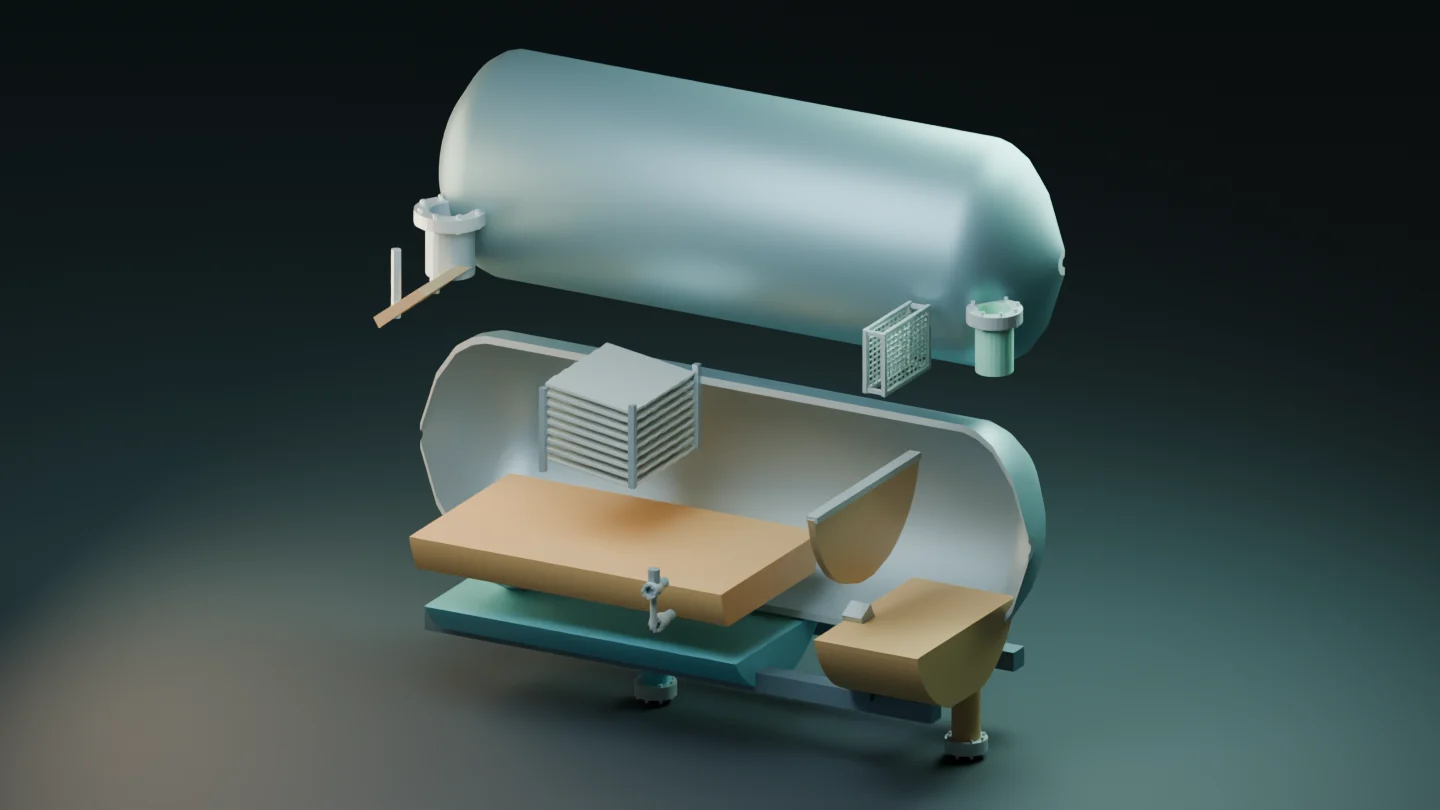
Inside the three-phase separator
Lift the shell to inspect where gas, oil and water separate.
Open the exploded modelModel assumptions
Training inputs are synthetic. The 100 L vessel treats the outlet as a mixed liquid stream and tracks oil and water by volume. The exercise uses fixed steps and ignores pressure, temperature, gas volume and droplet interactions. The 3D equipment study illustrates a separate three-phase design.
Echolocation Energy Academy
See the system.
Defend the decision.
Connect equipment, records and technical reasoning. Work through a short module and build an evidence trail an instructor can discuss with you.
More technical labs and examples
PETRONAS · Across the value chain
The journey
behind a litre.
Every handover carries equipment knowledge, product identity and evidence. Follow the conventional fuel route, then explore how renewable feedstock enters a different production pathway.
Production
Fuel knowledge, made tangible
A product is more
than its appearance.
The batch, the specification, the test and the record tell a story the eye alone cannot see. Connect those records to the equipment a learner is trying to understand.
Enter the fuel academy ↗A workflow to investigate
One change.
Which lessons need review?
Follow an authored training-document revision through its linked model labels, lesson passage and assessment. Review the affected items and download a concise change record.
Training document · Controlled example
How this review is prepared
This example uses explicit authored links between a document passage and learning material. A commissioned workflow would establish the document structure, source permissions, extraction method and validation set with the content owner.
Data workbench
Find the change.
Check the evidence.
Compare a recent vibration pattern with a reference window. Switch the record to see how missing observations change what can be said.
Inspect the observations
| Sample | Value |
|---|
Inside the separator
Follow the flow.
Understand the balance.
Change the inlet and outlet rates. Watch the liquid inventory respond as water and oil occupy the vessel. Explore the balance before opening the equipment model.
OilWaterGas space
Fuel physics laboratory
Small droplets.
A measurable difference.
Explore how droplet diameter, viscosity and density difference change a settling calculation. Compare the numbers, then explain why the motion changes.
The builders behind the experience
From the lesson
to the software underneath.
Interactive knowledge
Animated equipment, component inspection, bilingual learning experiences and instructor review. Start with an approved reference and build a lesson that preserves its context.
Try the learning flow ↗Our own programming language
Our programming language has a self-hosting compiler on Apple Silicon. We develop it for explicit, checked workflows. This page uses an RF²-derived WebAssembly kernel to count first-attempt correct answers.
See the working kernel and scope
AI can assist authoring. A human reviews the rules and approves changes before release.
Purpose-built environments
Our RU’OS work includes a native phone prototype built on Little Kernel, with retained physical-device recovery and note-persistence tests. Separate x86 boot experiments demonstrate 64-bit startup and deliberate stack-fault handling in an emulator. A potential pilot could package an approved lesson for a training kiosk or disconnected classroom.
A dedicated appliance would need its own hardware, security, reliability and support validation.
Prepare for a working session
Draft your pilot brief.
Describe one task, who does it today, and where they lose time. Download a brief you can share with your team.